Absolutely safe. Print Notion, as a browser extension, processes data locally using your existing Notion login session. We do NOT upload your Notion page content to our servers.
Specifically:
Why this matters to you:
If you handle financial reports, legal documents, employee records, or medical records, online tools require uploading content to third-party servers, which may violate your company's data security policies or industry regulations (GDPR, HIPAA, etc.). Print Notion ensures your data stays completely under your control.
Specifically:
- No page sharing required: No need to generate Notion public sharing links
- Local processing: All PDF generation happens in your browser
Why this matters to you:
If you handle financial reports, legal documents, employee records, or medical records, online tools require uploading content to third-party servers, which may violate your company's data security policies or industry regulations (GDPR, HIPAA, etc.). Print Notion ensures your data stays completely under your control.
Core difference: Data flow paths are completely different
Especially suitable for: Accountants (financial data), lawyers (legal documents), HR (employee information), medical institutions (medical records), executives (business secrets), and other professionals who need strict data privacy protection.
| Comparison | Print Notion | Online Tools |
|---|---|---|
| Data Path | Notion → Your Browser → PDF | Notion → Third-party Server → PDF |
| Page Sharing | No sharing required | Requires public link, exposes pages to internet users |
| Data Upload | Zero uploads | Must upload to server |
| Mail Merge | Full support for bulk generation | Not supported |
| Enterprise Compliance | Meets internal security policies | May violate data export restrictions |
Especially suitable for: Accountants (financial data), lawyers (legal documents), HR (employee information), medical institutions (medical records), executives (business secrets), and other professionals who need strict data privacy protection.
Chrome and Edge combined account for over 80% of browser market share. As a browser extension, Print Notion can work directly within Notion pages, with performance far superior to online tools.
Firefox version is under development. If you're a Firefox user, please contact us at support@printnotion.com and we'll notify you as soon as it's released.
Firefox version is under development. If you're a Firefox user, please contact us at support@printnotion.com and we'll notify you as soon as it's released.
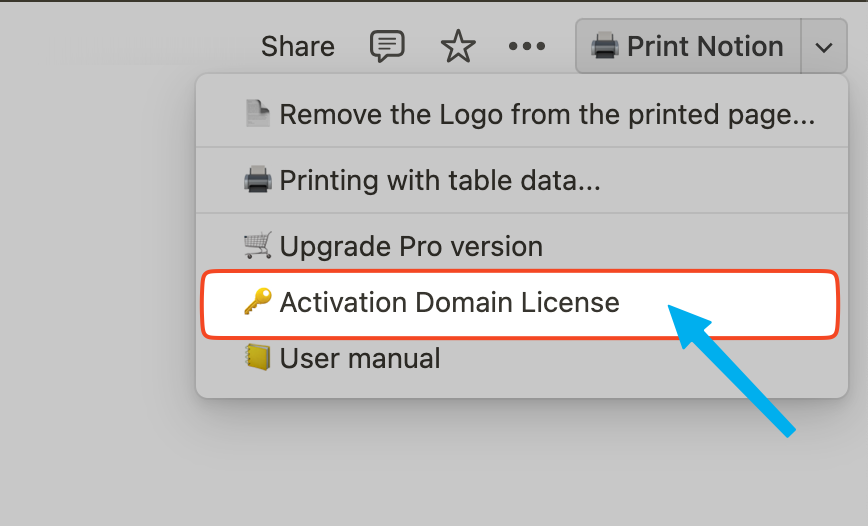
The Domain license is used for the activation of users under the same domain name. You can find and click 'Activation Domain License' in the Print Notion menu, and follow the page prompts to log in with the account of the domain name that purchased the Domain license, which can automatically activate the product.
If you need to increase the number of Domain licenses you have already purchased, please contact our customer service team. support@printnotion.com